
Server Sent Events (SSE)
Server Sent Events (SSE) allow client applications such as browsers to subscribe to a stream of relevant events without the overhead added by the bi-directional connection of websockets. Therefore, they are useful whenever the server would like to notify the client about changes. This article describes how to host an event source in Kotlin using genhttp-kt.
Example
The following example will host a SSE endpoint that will stream randomly generated updates on stock prices to a client until it disconnects.
import org.genhttp.api.content.io.Resource
import org.genhttp.engine.internal.Host

import org.genhttp.modules.io.*
import org.genhttp.modules.layouting.Layout
import org.genhttp.modules.practices.defaults
import org.genhttp.modules.serversentevents.EventConnection
import org.genhttp.modules.serversentevents.EventSource

import kotlinx.coroutines.delay

import kotlin.random.Random
import kotlin.time.Duration.Companion.seconds

suspend fun main() {
    val client = Content.from(Resource.fromClasspath("Client.html"))

    val stocks = EventSource.create()
        .generator(::generateStock)

    val app = Layout.create()
        .add("stock", stocks)
        .index(client)

    Host.create()
        .handler(app)
        .defaults()
        .development()
        .run()
}

suspend fun generateStock(connection: EventConnection) {
    val stockSymbols = listOf("AAPL", "GOOGL", "MSFT")

    connection.comment("Sending stock data")

    while (connection.connected) {
        val symbol = stockSymbols.random()

        connection.data(Random.nextInt(100, 1000), symbol)

        delay(1.seconds)
    }
}
For the client to be served, create a new Client.html in the resources of your project
(src/main/resources/Client.html) and paste the following content:
<!DOCTYPE html>
<html lang="en">
<head>
    <meta charset="UTF-8">
    <meta name="viewport" content="width=device-width, initial-scale=1.0">
    <title>Stock Tracker</title>
    <style>
        body {
            font-family: Arial, sans-serif;
        }
        #stocks {
            display: flex;
            flex-direction: column;
            gap: 10px;
            margin-top: 20px;
        }
        .stock {
            padding: 10px;
            border: 1px solid #ddd;
            border-radius: 5px;
            background-color: #f9f9f9;
        }
    </style>
</head>
<body>
<h1>Stock Tracker</h1>
<div id="stocks"></div>

<script>
    // Establish a connection to the server using Server-Sent Events
    const eventSource = new EventSource('http://localhost:8080/stock/');

    // Function to display stock updates
    function updateStock(symbol, value) {
        let stockElement = document.getElementById(symbol);

        if (!stockElement) {
            // Create a new element for the stock symbol if it doesn't exist
            stockElement = document.createElement('div');
            stockElement.id = symbol;
            stockElement.className = 'stock';
            document.getElementById('stocks').appendChild(stockElement);
        }

        // Update stock value
        stockElement.innerHTML = `<strong>${symbol}:</strong> ${value}`;
    }

    // Event listener for general updates
    eventSource.onmessage = function(event) {
        updateStock(event.type, event.data);
    };

    // Event listeners for specific stock symbols
    const symbols = ['AAPL', 'GOOGL', 'MSFT']; // Example stocks
    symbols.forEach(symbol => {
        eventSource.addEventListener(symbol, event => {
            updateStock(symbol, event.data);
        });
    });

    // Error handling
    eventSource.onerror = function() {
        console.error('Connection to the server lost.');
    };
</script>
</body>
</html>
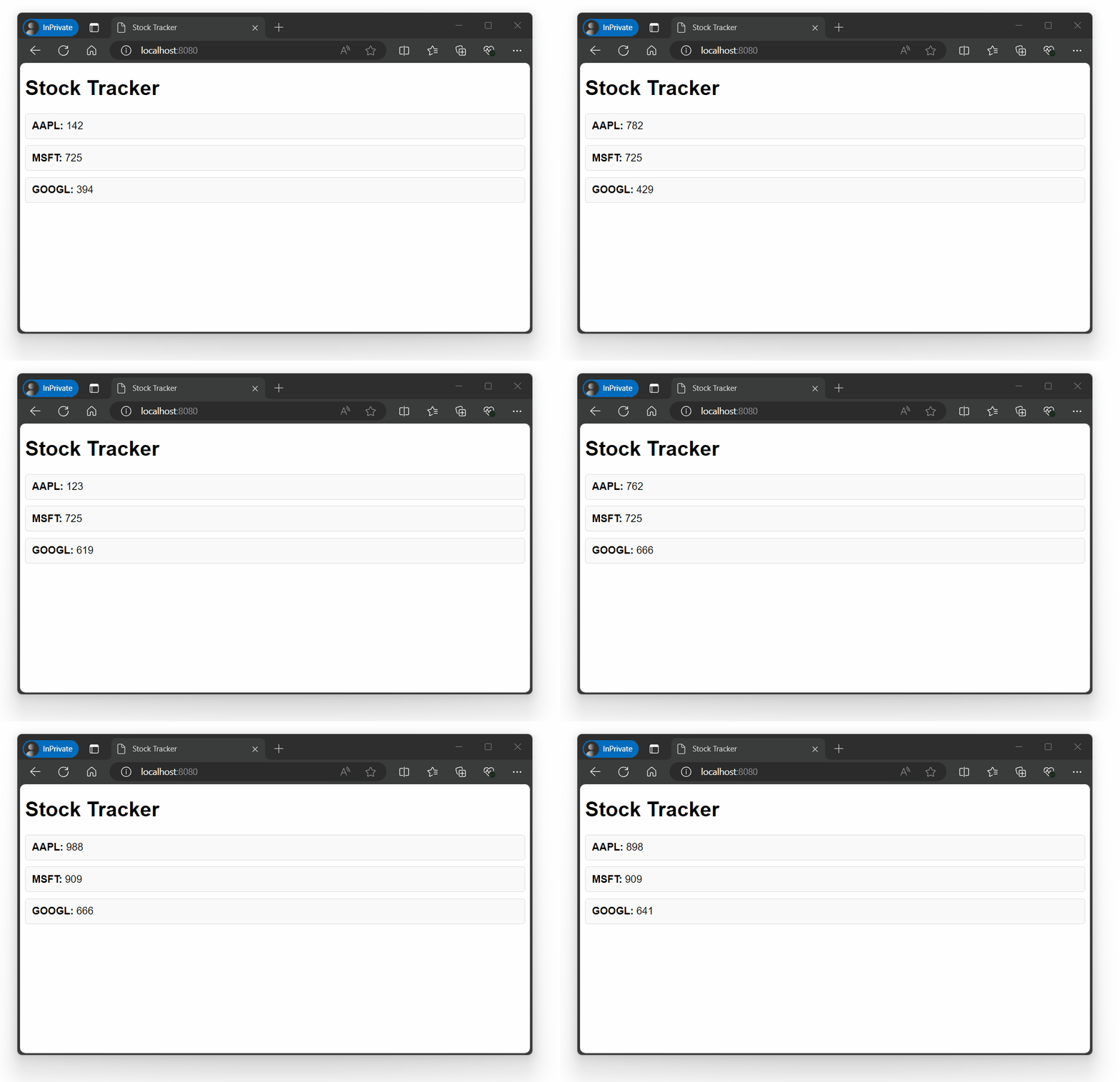
After running this sample and navigating to http://localhost:8080 in your browser, you will see a simple web application consuming the generated events:
Sending Data
The generator passed to the EventSource is a suspend function that receives an EventConnection
allowing you to interact with the connected client. As the specification allows
string messages only, there are some convenience functions to format Kotlin types
on the wire.
val source = EventSource.create()
    .generator { connection ->
        connection.comment("this is a comment")

        connection.data("string message")

        // formatted to string
        connection.data(42.1)

        // serialized to JSON
        connection.data(listOf("4711"))
    }
The formatters support basic types such as Int, Double, Boolean, UUID or LocalDate, everything
else is serialized to JSON with Jackson. You can customize this behavior by adding a
custom formatter to the registry of the source:
import org.genhttp.api.protocol.ByteString
import org.genhttp.api.protocol.ResponseContent

import org.genhttp.modules.conversion.Formatting
import org.genhttp.modules.conversion.formatters.Formatter
import org.genhttp.modules.io.strings.StringContent
import org.genhttp.modules.serversentevents.EventSource

import kotlin.reflect.KClass

data class Price(val cents: Long)

class PriceFormat : Formatter {

    override fun canHandle(type: KClass<*>) = type == Price::class

    override fun read(value: ByteString, type: KClass<*>) = Price(value.toString().toBigDecimal().movePointRight(2).toLong())

    override fun write(value: Any, type: KClass<*>): String = (value as Price).cents.toBigDecimal().movePointLeft(2).toPlainString()

    override fun getContent(value: Any): ResponseContent = StringContent(write(value, Price::class))

}

val registry = Formatting.default()
    .add(PriceFormat())

val eventSource = EventSource.create()
    .formatting(registry)
    .generator { connection -> connection.data(Price(4711)) } // data: 47.11
Event Types
When sending data, you can optionally specify a custom chosen event type. This allows clients to subscribe to the events they are interested in.
val source = EventSource.create()
    .generator { connection ->
        connection.data("user xyz logged in", eventType = "UserLogin")
    }
Event IDs
Event IDs allow you to establish a protocol where the client can tell which events they already consumed and the server resumes the event stream from this point on.
val source = EventSource.create()
    .generator { connection ->
        connection.data("some event", eventId = "4711")
    }
With this information, the client can specify the Last-Event-ID they consumed using a
HTTP header field when connecting to the server. This information is made
available via connection.lastEventId.
Parameters
The EventConnection provides access to the underlying HTTP request via connection.request, so
you can use query parameters or the request path to pass arguments to your logic. Query and header
values are read via getEntry(...) rather than indexed by key (see Request API),
and the current path segment is available via header.target:
val source = EventSource.create()
    .generator { connection ->
        // http://localhost:8080/events?user=123
        val userId = connection.request.header.query.getEntry("user")

        // http://localhost:8080/events/type
        val eventType = connection.request.header.target.current?.decode()
    }
Connection Lifecycle
Most scenarios will keep the connection to a client open until it disconnects from their side.
This implies some loop that can be achieved using the connected property of the connection:
val source = EventSource.create()
    .generator { connection ->
        while (connection.connected) {
            // wait for data and generate events
        }
    }
Please note that the server will only recognize that a client is no longer
connected when it tries to send data. Therefore, all of the data functions will
return a boolean value indicating whether the operation succeeded or not. If an operation
fails, the connected property will be set to false allowing your loop to exit on the
next evaluation.
If the server has no events to be sent to the client, it is recommended by the specification to periodically send comments to prevent proxy servers from cancelling the running request and to verify that the client is still connected.
If the server has no data for a connecting client and will most likely not produce any, the server
can indicate this to the client by sending a 204 No Content response. This way the server does not
have to maintain an open connection that will not be used for communication. For this purpose, the
API allows to pass an inspector that will be called before the generator is invoked to produce
events.
suspend fun inspect(request: Request, lastEventId: String?): Boolean {
    // return false to close the connection and instruct the client not to connect again
    return false
}

val source = EventSource.create()
    .inspector(::inspect)
    .generator { connection -> connection.comment("never sent") }
If a source system required to generate events is not available or it is clear that there will be no events for the client in the near future, you can also instruct the client to reconnect at a later point in time:
val source = EventSource.create()
    .generator { connection ->
        // instructs the client to reconnect in five minutes
        connection.retry(5 * 60 * 1000) // milliseconds
    }
After a retry message has been sent, the connection can no longer be used to send any messages and should be closed immediately by returning from the generator function.
Error Handling
By default, the EventSource handler will catch any exception that occurs in the generator logic, log
it to the server logger and instruct the client to reconnect after 30 seconds. As the HTTP headers for the
event stream have already been sent, there is no general mechanism to inform the client about errors. This
can be achieved by adding your own try/catch block to your generator:
val source = EventSource.create()
    .generator { connection ->
        try {
            // generate events
        } catch (e: CancellationException) {
            throw e
        } catch (e: Exception) {
            // log the error, inform the client, and instruct them to reconnect
            // put your custom error handling logic here

            println(e)

            connection.data(e.message ?: "Unknown error", eventType = "OnError")

            connection.retry(10_000)
        }
    }
A CancellationException (e.g. when the server shuts down) is not treated as an error of the generator: the
handler rethrows it instead of sending a retry, as structured concurrency expects - and so should your own
catch blocks, as in the example above.