
Websockets
Websockets allow to create a bidirectional connection between your clients and your server, allowing both sides to push content without the need of sending HTTP requests.
Flavors
There are three different flavors that you can use to host a web socket endpoint. They do not differ in functionality. In this section we will spawn a simple websocket server that will relay incoming messages to all other connected clients (so basically a simple chat application). In the “Client” section you will find a simple HTML file that can be opened in a browser to connect to your server.
Reactive
This flavor allows you to pass a handler instance that needs to implement ReactiveHandler
and will be notified when a client connects to your endpoint and starts to send messages. The connection provided
as a parameter in the handler functions allows you to send data to the connected client.
import org.genhttp.engine.internal.Host

import org.genhttp.modules.practices.defaults
import org.genhttp.modules.websockets.ReactiveConnection
import org.genhttp.modules.websockets.ReactiveHandler
import org.genhttp.modules.websockets.Websocket
import org.genhttp.modules.websockets.WebsocketFrame
import org.genhttp.modules.websockets.readPayload
import org.genhttp.modules.websockets.writePayload

import java.util.concurrent.CopyOnWriteArrayList

suspend fun main() {
    val websocket = Websocket.reactive()
        .handler(ChatHandler)

    Host.create()
        .handler(websocket)
        .defaults()
        .development()
        .run()
}

object ChatHandler : ReactiveHandler {

    private val clients = CopyOnWriteArrayList<ReactiveConnection>()

    override suspend fun onConnected(connection: ReactiveConnection) {
        clients.add(connection)
    }

    override suspend fun onMessage(connection: ReactiveConnection, message: WebsocketFrame) {
        val clientNumber = clients.indexOf(connection)
        val text = message.readPayload<String>()

        for (client in clients) {
            client.writePayload("[$clientNumber]: $text")
        }
    }

    override suspend fun onClose(connection: ReactiveConnection, message: WebsocketFrame) {
        clients.remove(connection)
        connection.close()
    }

}
All functions of ReactiveHandler have a default implementation, so a handler only overrides the
events it is interested in. The handler passed to handler(...) is shared by all connections - to
create a new instance of a handler class for every connection, register it with handler<MyHandler>()
instead (the class needs a constructor without parameters).
Functional
The functional flavor is very similar to the reactive one, but instead of passing a handler, you can directly define the event handlers on the builder:
import org.genhttp.engine.internal.Host

import org.genhttp.modules.practices.defaults
import org.genhttp.modules.websockets.ReactiveConnection
import org.genhttp.modules.websockets.Websocket
import org.genhttp.modules.websockets.readPayload
import org.genhttp.modules.websockets.writePayload

import java.util.concurrent.CopyOnWriteArrayList

suspend fun main() {
    val clients = CopyOnWriteArrayList<ReactiveConnection>()

    val websocket = Websocket.functional()
        .onConnected { connection ->
            clients.add(connection)
        }
        .onMessage { connection, message ->
            val clientNumber = clients.indexOf(connection)
            val text = message.readPayload<String>()

            for (client in clients) {
                client.writePayload("[$clientNumber]: $text")
            }
        }
        .onClose { connection, _ ->
            clients.remove(connection)
            connection.close()
        }

    Host.create()
        .handler(websocket)
        .defaults()
        .development()
        .run()
}
Imperative
While the functional and reactive flavor already dispatch incoming websocket frames to specific functions, the imperative mode requires you to provide the message loop yourself. This gives you more control over the connection, but requires a little bit more effort.
import org.genhttp.engine.internal.Host

import org.genhttp.modules.practices.defaults
import org.genhttp.modules.websockets.ImperativeConnection
import org.genhttp.modules.websockets.ImperativeHandler
import org.genhttp.modules.websockets.Websocket
import org.genhttp.modules.websockets.protocol.FrameType
import org.genhttp.modules.websockets.readPayload
import org.genhttp.modules.websockets.writePayload

import java.util.concurrent.CopyOnWriteArrayList

suspend fun main() {
    val websocket = Websocket.imperative()
        .handler(ChatHandler)

    Host.create()
        .handler(websocket)
        .defaults()
        .development()
        .run()
}

object ChatHandler : ImperativeHandler {

    private val clients = CopyOnWriteArrayList<ImperativeConnection>()

    override suspend fun handle(connection: ImperativeConnection) {
        clients.add(connection)

        val clientNumber = clients.indexOf(connection)

        try {
            while (connection.request.server.running) {
                val message = connection.readFrame()

                when (message.type) {
                    FrameType.Ping -> connection.pong(message.data)
                    FrameType.Text -> {
                        val text = message.readPayload<String>()

                        for (client in clients) {
                            client.writePayload("[$clientNumber]: $text")
                        }
                    }
                    FrameType.Close -> {
                        connection.close()
                        break
                    }
                    else -> {}
                }
            }
        } finally {
            clients.remove(connection)
        }
    }

}
Client
After starting the server, you can open the following HTML page in your browser to connect to the server:
<!DOCTYPE HTML PUBLIC "-//W3C//DTD HTML 4.0 Transitional//EN">
<html>
<head>
    <title>websocket client</title>
    <script type="text/javascript">
        var start = function () {
            var inc = document.getElementById('incoming');
            var wsImpl = window.WebSocket || window.MozWebSocket;
            var form = document.getElementById('sendForm');
            var input = document.getElementById('sendText');

            inc.innerHTML += "connecting to server ..<br/>";

            // create a new websocket and connect
            window.ws = new wsImpl('ws://localhost:8080/');

            // when data is coming from the server, this method is called
            ws.onmessage = function (evt) {
                inc.innerHTML += evt.data + '<br/>';
            };

            // when the connection is established, this method is called
            ws.onopen = function () {
                inc.innerHTML += '.. connection open<br/>';
            };

            // when the connection is closed, this method is called
            ws.onclose = function () {
                inc.innerHTML += '.. connection closed<br/>';
            }

            form.addEventListener('submit', function(e){
                e.preventDefault();
                var val = input.value;
                ws.send(val);
                input.value = "";
            });

        }
        window.onload = start;
    </script>
</head>
<body>
    <form id="sendForm">
        <input id="sendText" placeholder="Text to send" />
    </form>
    <pre id="incoming"></pre>
</body>
</html>
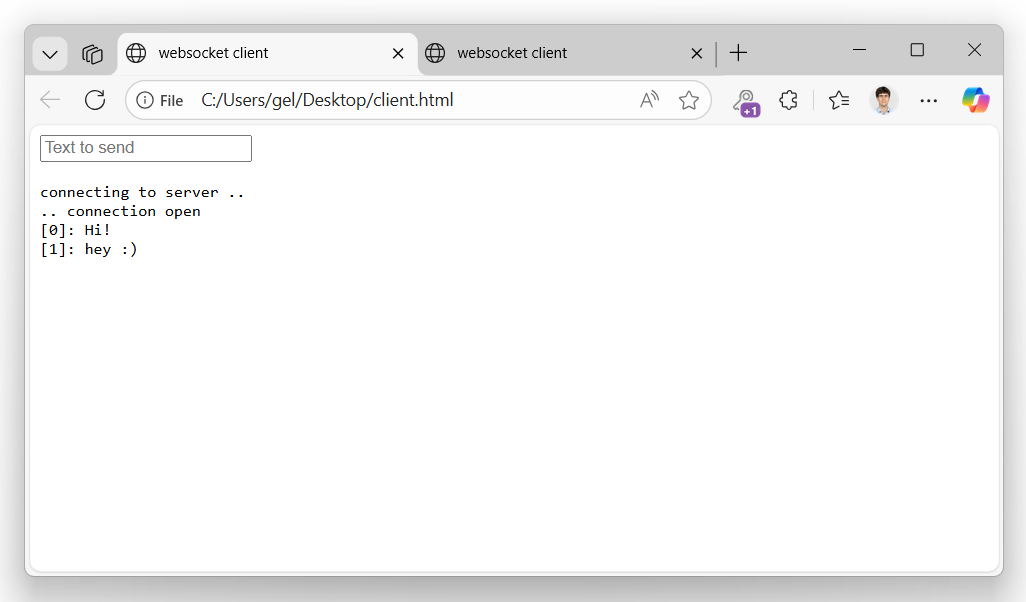
Every browser instance of this page will connect to the server and show messages entered in browser window.
Data Serialization
To send and receive objects via a websocket connection, the framework provides convenience functions that can be used:
data class Position(val x: Int, val y: Int)

val websocket = Websocket.functional()
    .onMessage { connection, message ->
        val position = message.readPayload<Position>()

        connection.writePayload(position.copy(x = position.x + 1))
    }
Those functions work both for primitives (e.g. Int, String, UUID or enums) as well as complex
types, that will be deserialized from and serialized into a specified format (defaults to JSON).
If needed, you can customize the formatters and serializers used by your websocket handler:
import org.genhttp.modules.conversion.Formatting
import org.genhttp.modules.conversion.formatters.FormattableFormatter
import org.genhttp.modules.conversion.serializers.yaml.YamlFormat
import org.genhttp.modules.websockets.ReactiveHandler
import org.genhttp.modules.websockets.Websocket

object ChatHandler : ReactiveHandler // as shown above

// read and write complex objects as YAML instead of JSON
val serialization = YamlFormat()

// only support numeric types and UUIDs as primitives
val formatters = Formatting.empty()
    .add(FormattableFormatter())
    .build()

val websocket = Websocket.reactive()
    .handler(ChatHandler)
    .serialization(serialization)
    .formatters(formatters)
Please note that these types are the same that are used by the web service frameworks to read and write typed data, so you might want to share them to unify the behavior of your API.
Further Considerations
In contrast to regular webservice handlers, websockets can be used for long-running processes and to inform clients about events that happen in your systems. As this changes the typical request/response characteristic of a web server, there are things to be considered when implementing a websocket handler, which will be discussed in this section.
Long-running Tasks
In the default implementation of the reactive and functional handler, the server waits for the user code to be finished before processing the next incoming frame. This means that long-running jobs executed within your handler functions will block the message pump of the websocket, causing ping requests not to be answered, eventually causing the client to drop the connection to the server. This also applies to blocking calls - they only park the virtual thread the connection runs on, but the message pump still waits for them. Therefore, if you would like to execute a long-running task from a message handler, you should launch a new coroutine for it, so the handler can directly return to the message loop.
As launching a coroutine per message introduces additional overhead and gives up the order in which messages are processed, this behavior is not provided by the web server and needs to be manually implemented.
import kotlinx.coroutines.CoroutineScope
import kotlinx.coroutines.Dispatchers
import kotlinx.coroutines.SupervisorJob
import kotlinx.coroutines.cancel
import kotlinx.coroutines.launch

import org.genhttp.modules.websockets.ReactiveConnection
import org.genhttp.modules.websockets.ReactiveHandler
import org.genhttp.modules.websockets.WebsocketFrame

// one instance per connection: Websocket.reactive().handler<ImportHandler>()
class ImportHandler : ReactiveHandler {

    private val jobs = CoroutineScope(SupervisorJob() + Dispatchers.Default)

    override suspend fun onMessage(connection: ReactiveConnection, message: WebsocketFrame) {
        jobs.launch {
            // ...
        }
    }

    override suspend fun onClose(connection: ReactiveConnection, message: WebsocketFrame) {
        jobs.cancel()
        connection.close()
    }

}
Synchronizing Write Access
Depending on your use case, you might want to write to the websocket connection
from different coroutines as relevant events happen in your system. As the websocket
connection is not thread safe, you need to synchronize write access manually, e.g. via
an additional extension function. A Mutex of kotlinx.coroutines suspends instead of blocking
while it waits, and unlike synchronized it may be held across the suspension points of the write:
import kotlinx.coroutines.sync.Mutex
import kotlinx.coroutines.sync.withLock

import org.genhttp.modules.websockets.SocketConnection
import org.genhttp.modules.websockets.protocol.FrameType
import org.genhttp.modules.websockets.writePayload

object WebsocketSynchronization {

    val writeLock = Mutex()

}

suspend inline fun <reified T> SocketConnection.writeSynchronized(payload: T, opcode: FrameType = FrameType.Text) {
    WebsocketSynchronization.writeLock.withLock {
        writePayload(payload, opcode)
    }
}
Note that writePayload always flushes the frame it writes immediately - see
Frame Batching below if you want to buffer several writes and flush them together;
in that case, synchronize around write/flush of SocketConnection instead.
Frame Batching
write, ping, pong and close of SocketConnection all accept a flush
parameter (defaulting to true). Passing flush = false buffers the frame instead of sending it
immediately; call flush() once you are done to send everything that has been buffered in one
go. This is useful if you are writing several frames in a row and want to avoid the overhead of a
separate network write per frame.
import org.genhttp.modules.websockets.SocketConnection

import java.nio.ByteBuffer

suspend fun sendAll(connection: SocketConnection, payloads: List<ByteBuffer>) {
    for (payload in payloads) {
        connection.write(payload, flush = false)
    }

    connection.flush()
}
Continuation Handling
If a client sends a large chunk of data, browsers may segment this data
into multiple continuation messages. The websocket handler will collect those frames and
automatically merge them into a single WebsocketFrame passed to your logic. A single frame may
carry at most 16 KB (BufferSize.Read) - larger frames are rejected with a PayloadTooLarge error,
so clients sending more data than that need to split it into continuation frames.
If you would like to handle continuation frames yourself, you can call
.handleContinuationFramesManually() on the builder instances and will
start to receive frames with type being set to FrameType.Continue.
Allocation Handling
By default, the websocket handler will allocate a new buffer per frame to
keep the data available after the next message has already been read from
the underlying connection. This allows users to store frames or their data.
For high performance scenarios, you can disable this automatic allocation
by calling .doNotAllocateFrameData() on the builder and access the raw buffer
via frame.raw.memory (or frame.raw.segments for a message consisting
of multiple continuation frames). frame.raw is typed RawFrameData, a public interface you
can also implement or wrap yourself if you need to.