
Open API
This concern dynamically generates and serves an Open API v3 specification using swagger-core for all detected API endpoints.
Webservices
import org.genhttp.engine.internal.Host

import org.genhttp.modules.layouting.*
import org.genhttp.modules.openapi.*
import org.genhttp.modules.webservices.*

suspend fun main() {
    val api = Layout.create()
        .addService<UserService>("users")
        .addOpenApi()

    Host.create()
        .handler(api)
        .development()
        .run()
}

data class User(val id: Int, val name: String)

class UserService {

    @ResourceMethod
    fun getUsers(): List<User> = emptyList()

    @ResourceMethod(path = ":id")
    fun getUser(id: Int): User = User(id, "John Doe")

}
Functional
import org.genhttp.engine.internal.Host

import org.genhttp.modules.functional.*
import org.genhttp.modules.openapi.*

suspend fun main() {
    val api = Inline.create()
        .get("/users") { emptyList<User>() }
        .get("/user/:id") { id: Int -> User(id, "John Doe") }
        .addOpenApi()

    Host.create()
        .handler(api)
        .development()
        .run()
}

data class User(val id: Int, val name: String)
Controllers
import org.genhttp.engine.internal.Host

import org.genhttp.modules.controllers.*
import org.genhttp.modules.layouting.*
import org.genhttp.modules.openapi.*
import org.genhttp.modules.reflection.*

suspend fun main() {
    val api = Layout.create()
        .addController<UserController>("users")
        .addOpenApi()

    Host.create()
        .handler(api)
        .development()
        .run()
}

data class User(val id: Int, val name: String)

class UserController {

    @ControllerAction(Method.Get)
    fun list(): List<User> = emptyList()

    @ControllerAction(Method.Get)
    fun find(@FromPath id: Int): User = User(id, "John Doe")

}
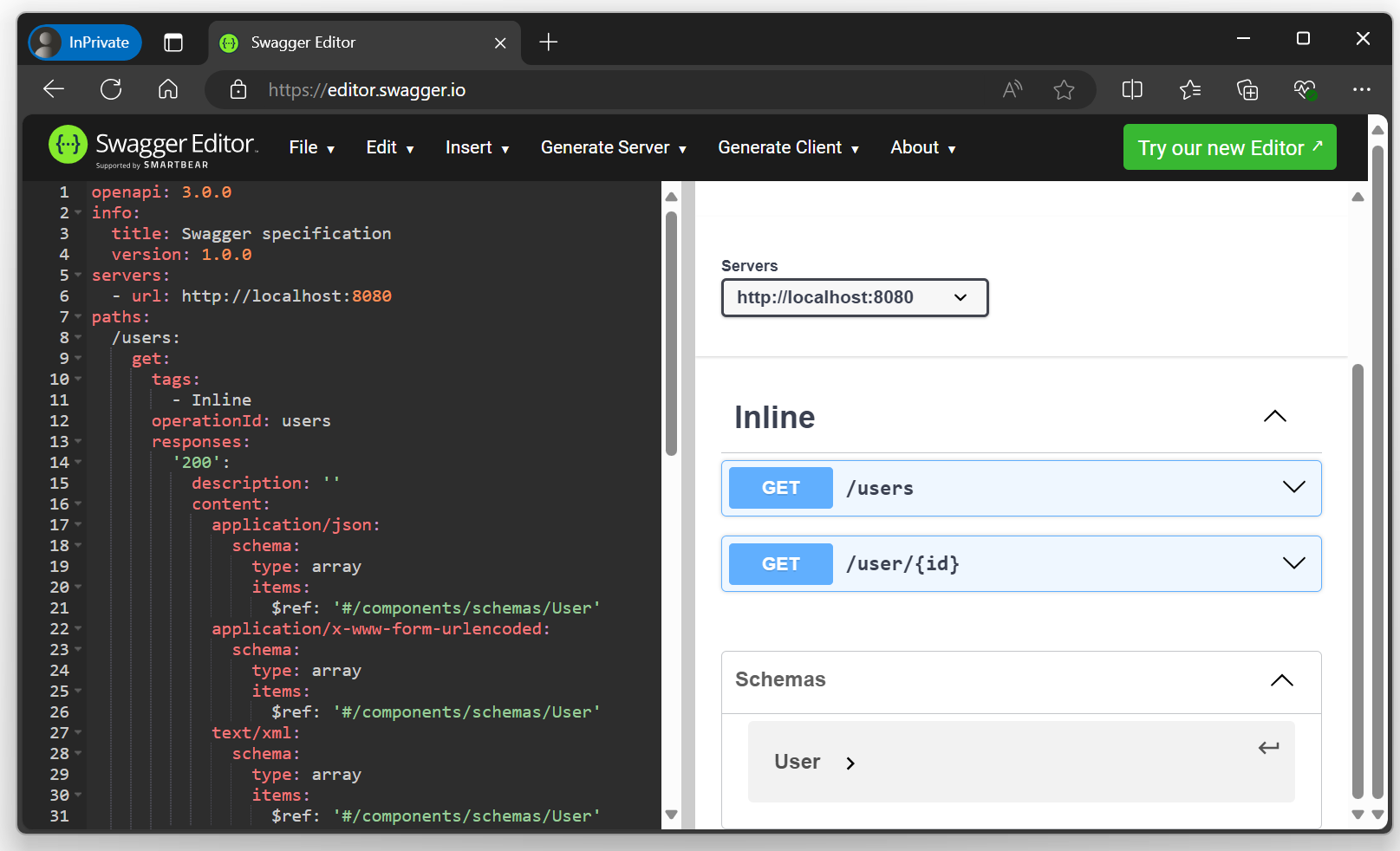
This example provides an API with two operations and hosts a self-describing Open API specification via http://localhost:8080/openapi.json.
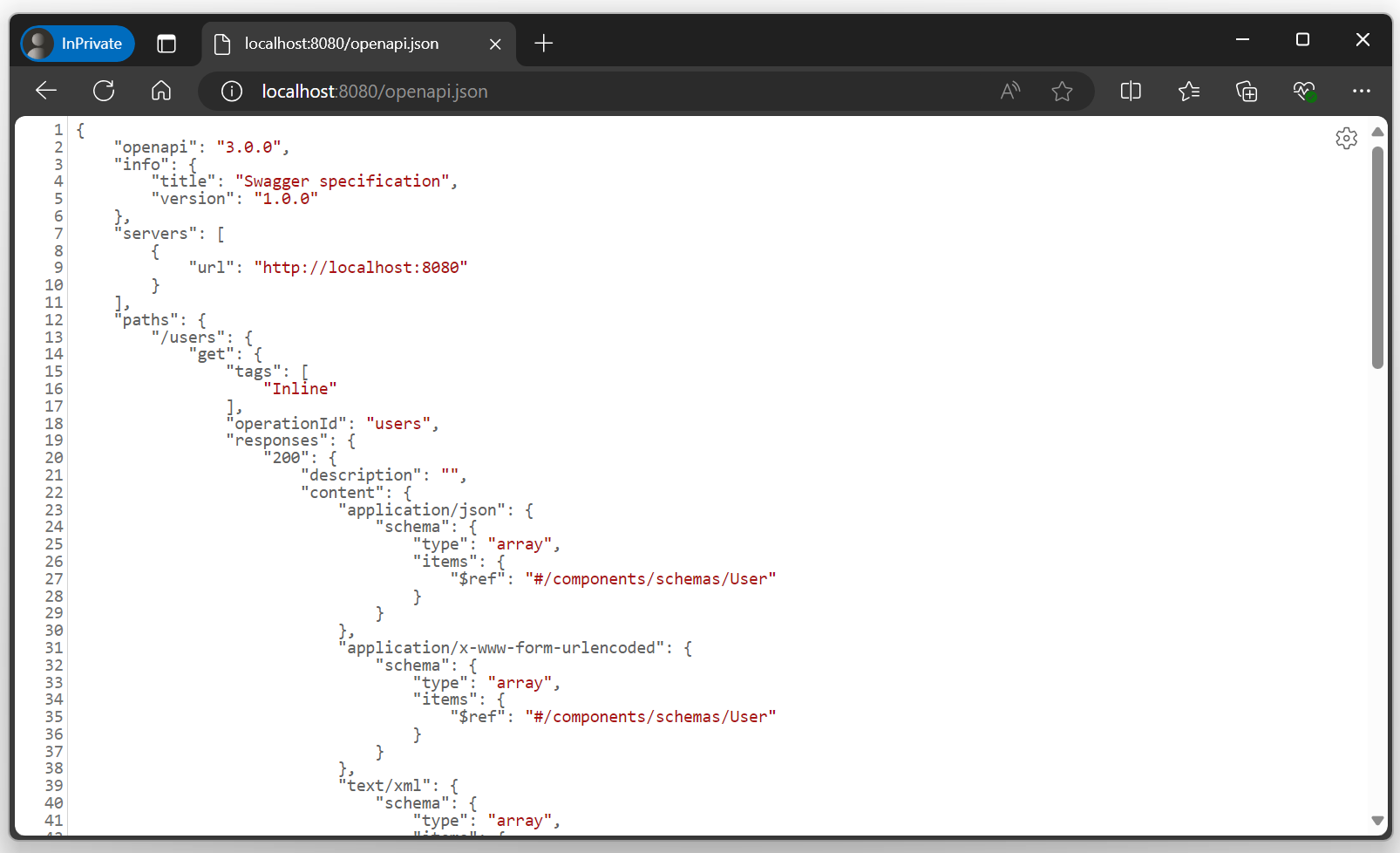
You can import this specification into other tools such as Postman or Swagger Editor to execute requests or generate client implementations.
Endpoints
The Open API concern provides the following endpoints:
| Endpoint | Description |
|---|---|
/openapi.json | Open API specification serialized to application/json. |
/openapi.yaml | Open API specification serialized to application/yaml. |
/openapi.yml | Open API specification serialized to application/yaml. |
/openapi | Serialized depending on the Accept header of the request, falls back to application/json. |
Documentation
By default, the specification is derived from the signatures of the functions implementing the
operations. To add descriptions, additional responses or headers, you can annotate your services,
functions, parameters and models with the annotations provided by the org.genhttp.api.content.services
package. As these annotations are part of the genhttp-api package, projects that only contain
services or models do not need to depend on the Open API module.
Webservices
import org.genhttp.api.content.services.*
import org.genhttp.api.protocol.ResponseStatus
import org.genhttp.engine.internal.Host

import org.genhttp.modules.layouting.*
import org.genhttp.modules.openapi.*
import org.genhttp.modules.reflection.*
import org.genhttp.modules.webservices.*

suspend fun main() {
    val api = Layout.create()
        .addService<UserService>("users")
        .addOpenApi()

    Host.create()
        .handler(api)
        .development()
        .run()
}

@Summary("A user of the application")
data class User(
    @Summary("The unique identifier of the user") val id: Int,
    @Summary("The display name of the user") val name: String
)

data class ApiError(val message: String)

@Tag("Users")
@Summary("Manages the users of the application")
@ApiResponse(ResponseStatus.BadRequest, "The request could not be processed", type = ApiError::class)
class UserService {

    @ResourceMethod(path = ":id")
    @Summary("Fetches a single user")
    @ApiResponse(ResponseStatus.NotFound, "There is no user with the given ID")
    fun getUser(@Summary("The ID of the user to fetch") id: Int): @Summary("The user with the given ID") User =
        User(id, "John Doe")

    @ResourceMethod(Method.Post)
    @Summary("Creates a new user")
    @Remarks("The ID of the user is assigned by the server.")
    @ApiResponse(ResponseStatus.Created, "The newly created user")
    fun createUser(@Summary("The user to be created") user: User): Result<User> =
        Result(user).status(ResponseStatus.Created)

}
Functional
import org.genhttp.api.content.services.*
import org.genhttp.api.protocol.ResponseStatus
import org.genhttp.engine.internal.Host

import org.genhttp.modules.functional.*
import org.genhttp.modules.openapi.*
import org.genhttp.modules.reflection.*

suspend fun main() {
    val api = Inline.create()
        .get("/users/:id", ::getUser)
        .post("/users", ::createUser)
        .addOpenApi()

    Host.create()
        .handler(api)
        .development()
        .run()
}

@Summary("Fetches a single user")
@ApiResponse(ResponseStatus.NotFound, "There is no user with the given ID")
fun getUser(@Summary("The ID of the user to fetch") id: Int): @Summary("The user with the given ID") User =
    User(id, "John Doe")

@Summary("Creates a new user")
@Remarks("The ID of the user is assigned by the server.")
@ApiResponse(ResponseStatus.Created, "The newly created user")
fun createUser(@Summary("The user to be created") user: User): Result<User> =
    Result(user).status(ResponseStatus.Created)

@Summary("A user of the application")
data class User(
    @Summary("The unique identifier of the user") val id: Int,
    @Summary("The display name of the user") val name: String
)
Controllers
import org.genhttp.api.content.services.*
import org.genhttp.api.protocol.ResponseStatus
import org.genhttp.engine.internal.Host

import org.genhttp.modules.controllers.*
import org.genhttp.modules.layouting.*
import org.genhttp.modules.openapi.*
import org.genhttp.modules.reflection.*

suspend fun main() {
    val api = Layout.create()
        .addController<UserController>("users")
        .addOpenApi()

    Host.create()
        .handler(api)
        .development()
        .run()
}

@Summary("A user of the application")
data class User(
    @Summary("The unique identifier of the user") val id: Int,
    @Summary("The display name of the user") val name: String
)

data class ApiError(val message: String)

@Tag("Users")
@Summary("Manages the users of the application")
@ApiResponse(ResponseStatus.BadRequest, "The request could not be processed", type = ApiError::class)
class UserController {

    @ControllerAction(Method.Get)
    @Summary("Fetches a single user")
    @ApiResponse(ResponseStatus.NotFound, "There is no user with the given ID")
    fun find(@FromPath @Summary("The ID of the user to fetch") id: Int): @Summary("The user with the given ID") User =
        User(id, "John Doe")

    @ControllerAction(Method.Post)
    @Summary("Creates a new user")
    @Remarks("The ID of the user is assigned by the server.")
    @ApiResponse(ResponseStatus.Created, "The newly created user")
    fun create(@Summary("The user to be created") user: User): Result<User> =
        Result(user).status(ResponseStatus.Created)

}
The annotations are read from functions, and Kotlin does not allow annotations on the parameters
of a lambda, so a functional handler that should be documented is implemented by a function and
added as a function reference (::getUser), as shown above.
The following annotations are available:
| Annotation | Applies to | Description |
|---|---|---|
@Summary | Services, functions, parameters, return types, models, properties | A short description of the annotated element. |
@Remarks | Services, functions, models, properties | A detailed explanation, which will be rendered as Markdown by most tools. |
@Tag | Services, functions | The group the operations are listed under. |
@ApiRequestBody | Functions | Describes the body expected by the operation. |
@ApiResponse | Services, functions | Declares a response that may be generated by the operation. |
@ApiRequestHeader | Services, functions | Declares a header that is read from the request. |
@ApiResponseHeader | Services, functions | Declares a header that is sent with the response. |
Annotations placed on a service or controller class apply to all operations provided by this class.
GenHTTP calls the annotations for bodies, responses and headers [RequestBody], [Response],
[RequestHeader] and [ResponseHeader]. genhttp-kt prefixes them with Api (as known from Swagger),
so they do not clash with the RequestBody, Response and RequestHeader types of the API.
Annotation parameters cannot be null in Kotlin, so optional parameters that are not set are
"" or Nothing::class, and the status of @ApiResponseHeader is an array with at most one entry.
Operations and Models
On a function, @Summary and @Remarks set the summary and the description of the operation.
On a parameter, the summary describes the corresponding parameter of the operation (or the request body,
if the argument is read from the body). On the return type (fun getUser(): @Summary("...") User), it describes
the successful response of the operation.
On model types and their properties, @Summary and @Remarks are added to the generated JSON
schema. For classes with a primary constructor, such as data classes, the annotations can be placed on the
parameters of the constructor as shown in the example above, so there is no need to target the property
with @property:Summary("...").
Functions annotated with @Deprecated (the one of Kotlin or of Java) will be flagged as deprecated.
Grouping
Operations are grouped by the name of the class they are declared in. Operations of
functional handlers that are implemented by lambdas are grouped
under Inline. Placing @Tag on a service class lists all of its operations under the given name,
while summary and remarks of the class are used to describe this group. Placing @Tag on a function
lists this operation under the given name, regardless of the class it is declared in.
A function reference added to a functional handler is grouped like a function of a service: under
the name of the class or object declaring it. For a top-level function, this is the class the Kotlin
compiler generates for its file (such as MainKt for Main.kt). Use @Tag on the function, or
declare the functions in an object and add them as Users::getUser, to choose the group.
Request Bodies
The request body is derived from the parameters of the function. If your function reads the
body on its own (e.g. from the request or a stream), or accepts specific content types only,
you can describe the body with the @ApiRequestBody annotation. Declaring multiple bodies with
different content types will merge them into a single request body. The annotation is ignored
for GET operations.
import org.genhttp.api.content.services.ApiRequestBody
import org.genhttp.api.protocol.Request

import org.genhttp.modules.reflection.Method
import org.genhttp.modules.webservices.ResourceMethod

import java.io.InputStream

data class User(val id: Int, val name: String)

class UserService {

    @ResourceMethod(Method.Put, "avatar")
    @ApiRequestBody("The new avatar of the user", contentType = "image/png")
    @ApiRequestBody(contentType = "image/jpeg")
    fun setAvatar(content: InputStream) { /* ... */ }

    @ResourceMethod(Method.Post, "import")
    @ApiRequestBody("The users to be imported", type = Array<User>::class)
    suspend fun importUsers(request: Request) { /* ... */ }

}
If only a description is given, the content types and the schema derived from the function signature
are kept. As annotations cannot carry type arguments, a list is described by the corresponding
array type (Array<User>::class).
Responses
Responses are derived from the return type of the function. The @ApiResponse annotation declares
additional responses, such as errors that may occur. If no description is given, it is derived
from the status (e.g. Not Found), and the content type is derived from the serialization formats
supported by the service, if a type is given. Use contentType to announce a specific format,
e.g. for functions that return a dynamically generated Response:
import org.genhttp.api.content.services.ApiResponse
import org.genhttp.api.protocol.Request
import org.genhttp.api.protocol.Response
import org.genhttp.api.protocol.ResponseStatus

import org.genhttp.modules.webservices.ResourceMethod

class UserService {

    @ResourceMethod(path = "avatar")
    @ApiResponse(ResponseStatus.Ok, "The avatar of the user", contentType = "image/png")
    @ApiResponse(ResponseStatus.Ok, contentType = "image/jpeg")
    fun getAvatar(request: Request): Response = TODO("render the avatar")

}
The following rules apply:
- Declaring a successful response (2xx) on a function replaces the derived responses. This allows to announce
that an operation responds with
201 Createdinstead of200 OK. If notypeis given, the return type of the function is used to describe the content. - Responses declared on a service class apply to all operations of this service that do not declare a response with the same status on their own. This allows to document common error responses in a single place.
- Declaring multiple responses with the same status but different content types will merge them into a single response.
Headers
Headers read from the request or sent with the response can be declared with the @ApiRequestHeader
and @ApiResponseHeader annotations. By default, headers are expected to be strings, which can be changed
by setting the type parameter.
import org.genhttp.api.content.services.ApiRequestHeader
import org.genhttp.api.content.services.ApiResponse
import org.genhttp.api.content.services.ApiResponseHeader
import org.genhttp.api.protocol.Request
import org.genhttp.api.protocol.ResponseStatus

import org.genhttp.modules.webservices.ResourceMethod

data class User(val id: Int, val name: String)

class UserService {

    @ResourceMethod
    @ApiRequestHeader("X-Page", "The page to be returned", type = Int::class)
    @ApiResponseHeader("X-Total-Count", "The total number of users", type = Int::class)
    @ApiResponse(ResponseStatus.TooManyRequests, "Too many requests have been sent")
    @ApiResponseHeader("Retry-After", "The number of seconds to wait", status = [ResponseStatus.TooManyRequests], type = Int::class)
    fun getUsers(request: Request): List<User> = TODO("read the requested page")

}
A request header is optional unless required is set to true. A response header without a
status is added to all successful responses (2xx) of the operation. If a status is given,
the header is only added if the operation declares a response with this status.
Concerns
Concerns such as range support add functionality to the content they
wrap, e.g. by reading additional headers or generating additional responses. Concerns that
implement the DocumentedConcern interface add this functionality to the generated specification.
The following concerns shipped with the framework document themselves:
| Concern | Documentation |
|---|---|
| Client Caching (Policy) | Expires header for successful GET responses |
| Client Caching (Validation) | If-None-Match request header, 304 Not Modified response and ETag headers |
| Decompression | Content-Encoding request header for operations accepting a body |
| Localization | Content-Language header for successful responses |
| Range Support | Range request header, 206 and 416 responses with the corresponding headers |
To document a custom concern, implement DocumentedConcern instead of Concern. The addDocumentation
function is called for every operation provided by the wrapped content, with method indicating the
HTTP verb of the operation. Concerns may add ApiResponse, ApiRequestHeader and ApiResponseHeader
instances (Kotlin allows to create annotations like any other object), other kinds of documentation are ignored.
import org.genhttp.api.content.Handler
import org.genhttp.api.content.services.ApiResponse
import org.genhttp.api.content.services.ApiResponseHeader
import org.genhttp.api.content.services.DocumentedConcern
import org.genhttp.api.content.services.OperationDocumentation
import org.genhttp.api.infrastructure.Server
import org.genhttp.api.protocol.Request
import org.genhttp.api.protocol.Response
import org.genhttp.api.protocol.ResponseStatus

class RateLimitConcern(override val content: Handler) : DocumentedConcern {

    override suspend fun prepare(server: Server) = content.prepare(server)

    override suspend fun handle(request: Request): Response? {
        // check the rate limit and respond with 429 if exceeded
        return content.handle(request)
    }

    override fun addDocumentation(operation: OperationDocumentation) {
        operation.add(ApiResponse(ResponseStatus.TooManyRequests, "Too many requests have been sent"))
            .add(
                ApiResponseHeader(
                    "Retry-After",
                    "The number of seconds to wait",
                    status = arrayOf(ResponseStatus.TooManyRequests),
                    type = Int::class
                )
            )
    }

}
The documentation added by a concern is treated as if it was declared on the service class of the operation. Documentation declared on the service itself and documentation added by concerns closer to the content take precedence.
Customizing
To customize the generated specification you can pass a function that will be executed
just before the document is serialized and sent to the requesting client. The function
receives the io.swagger.v3.oas.models.OpenAPI model of swagger-core.
import org.genhttp.engine.internal.Host

import org.genhttp.modules.functional.*
import org.genhttp.modules.openapi.*

suspend fun main() {
    val description = ApiDescription.create()
        .title("My awesome API")
        .version("2.0.7")
        .postProcessor { _, document -> document.info.termsOfService = "https://mycompany.com/tos" }

    val api = Inline.create()
        .add(description)

    Host.create()
        .handler(api)
        .development()
        .run()
}
Without a title or version, the specification is titled Swagger specification with version 1.0.0.
Caching
As automatically generating a specification is an expensive task, the concern will cache the generated document for improved performance. In some cases you might want the specification to be generated on every request, especially if the result depends on the request sent by the client. In this case, you can disable caching, causing the document to be generated on every request.
val description = ApiDescription.create()
    .caching(false)
Visualizing Definitions
To explore your APIs using graphical applications such as Swagger or Redoc, you can use the API browsing functionality.
Custom Discovery
By default, automatic discovery will handle functional handlers,
webservices and controllers
and will traverse automatically through layouts and
concerns. If you would like to support an additional handler, you can
initialize a registry and pass a custom ApiExplorer.
The following example adds support for redirects, so the generated Open API specification will describe the operation.
import io.swagger.v3.oas.models.OpenAPI
import io.swagger.v3.oas.models.Operation
import io.swagger.v3.oas.models.PathItem
import io.swagger.v3.oas.models.headers.Header
import io.swagger.v3.oas.models.media.StringSchema
import io.swagger.v3.oas.models.responses.ApiResponse
import io.swagger.v3.oas.models.responses.ApiResponses

import org.genhttp.api.content.Handler
import org.genhttp.api.protocol.Request
import org.genhttp.engine.internal.Host

import org.genhttp.modules.layouting.*
import org.genhttp.modules.openapi.*
import org.genhttp.modules.openapi.discovery.*
import org.genhttp.modules.redirects.*
import org.genhttp.modules.redirects.provider.RedirectProvider

suspend fun main() {
    val discovery = ApiDiscovery.default()
        .add<RedirectExplorer>()

    val description = ApiDescription.with(discovery)

    val api = Layout.create()
        .add("google", Redirect.to("https://google.com"))
        .add(description)

    Host.create()
        .handler(api)
        .development()
        .run()
}

class RedirectExplorer : ApiExplorer {

    override fun canExplore(handler: Handler): Boolean = handler is RedirectProvider

    override suspend fun explore(
        request: Request,
        handler: Handler,
        path: List<String>,
        document: OpenAPI,
        schemata: SchemaManager,
        documentation: InheritedDocumentation,
        registry: ApiDiscoveryRegistry
    ) {
        if (handler is RedirectProvider) {
            val apiPath = buildPath("", path, false)

            val location = Header()
                .schema(StringSchema())
                .example(handler.target.toString())

            val response = ApiResponse()
                .description(if (handler.temporary) "Temporary Redirect" else "Moved Permanently")
                .addHeaderObject("Location", location)

            val status = if (handler.temporary) "307" else "301"

            val operation = Operation()
                .responses(ApiResponses().addApiResponse(status, response))

            document.path(apiPath, PathItem().get(operation))
        }
    }

}
Explorers for handlers that wrap other handlers should pass the given documentation on when
exploring their children via the registry, so that the documentation added by
concerns further up in the chain is applied to the operations found.
If you would like to have an API explorer for a handler that is shipped with the framework, feel free to get in touch via a GitHub issue.